
In this article, you will learn how to check the number of active users in GoFreight.
Note: By default, only users with the General Manager or Admin role can access this information.
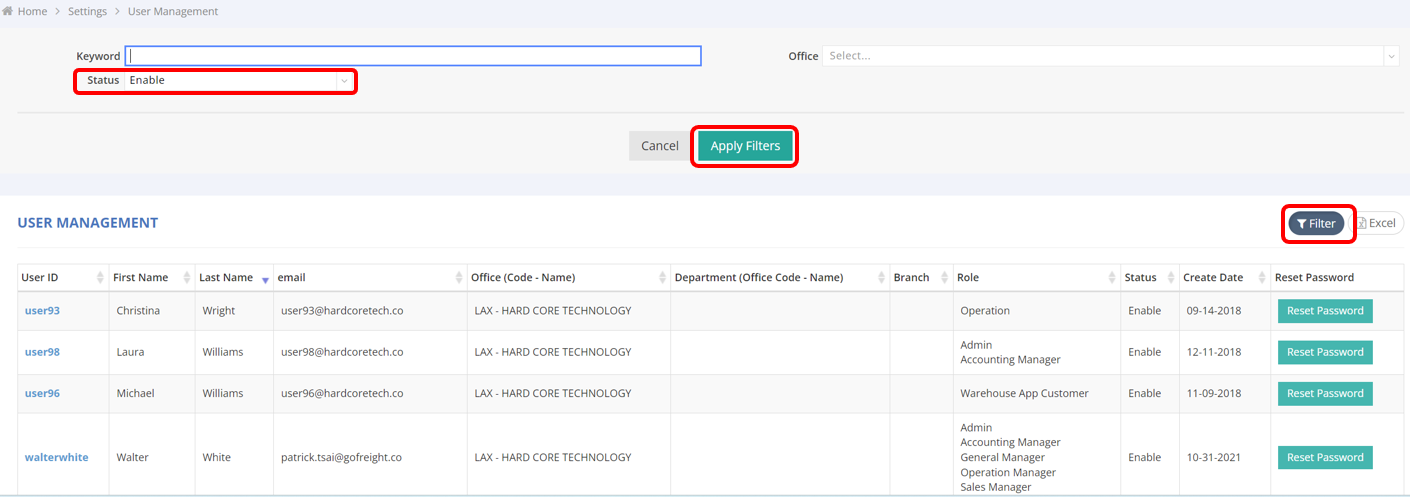
- Go to "Settings" > "User Management" in the left-side navigation bar.

- Click on "Filter."
- Select "Enable" in the Status dropdown menu.
- Click "Apply Filters."
The table will then display the active users.
FAQ
Q: Could you please provide the current list of personnel using GoFreight in our company?
A: Hello! Users with Admin or General Manager roles can view the current user list at any time by going to Settings > User Management. Simply apply the Enable filter to obtain a list of all active users on the GoFreight system.