How to quickly calculate volume weight in Air Export
Accurately entering the Gross Weight and dimensions is important for calculating the volumetric weight of an air shipment.
The Set Dimensions function allows you to input Gross Weight and dimension details in one place. Below is a demonstration of how to use the Set Dimensions function in the Air Export module.
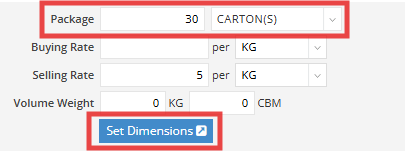
Step 1: Set Package Information
In the Package field, enter the quantity and select the unit of the shipment.
For example, we have 30 cartons on this HAWB.
Step 2: Set Dimensions
Click “Set Dimensions” to input the Gross Weight and Dimensions
Step 3: Enter Dimension Details
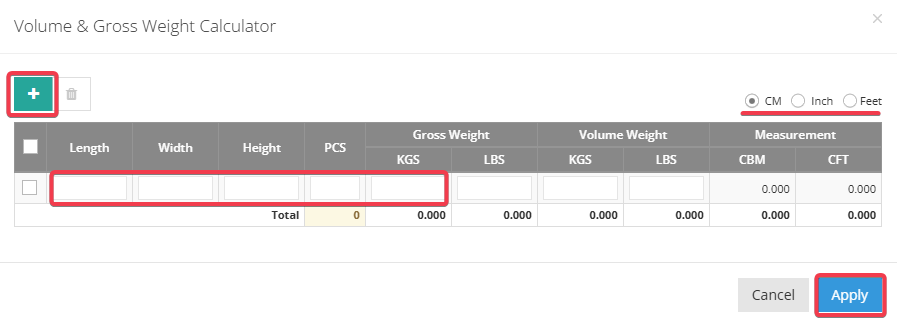
In the pop-up window for Volume & Gross Weight Calculator
- Click the green plus (+) button to add dimension and pieces.
- Select the preferred unit of measurement above the input fields:
- cm (centimeters)
- inches
- feet
- cm (centimeters)
- Enter the length, width, and height accordingly.
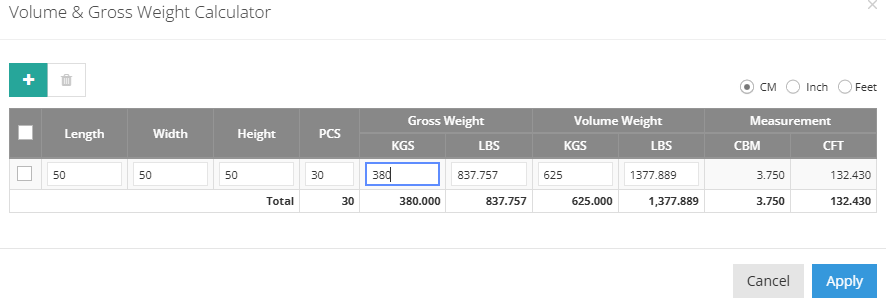
- Enter the Gross Weight directly in the KGS field; the value of LBS will be automatically calculated.
Once applied, the Gross Weight and calculated Volume Weight will be automatically applied to the shipment page.

Important Notice
Gross Weight Overwrite Behavior
If you have entered a Gross Weight before clicking “Set Dimensions,” please ensure that the same Gross Weight value is entered again in the Set Dimensions window.
Entering 0 or leaving the Gross Weight blank is not recommended.
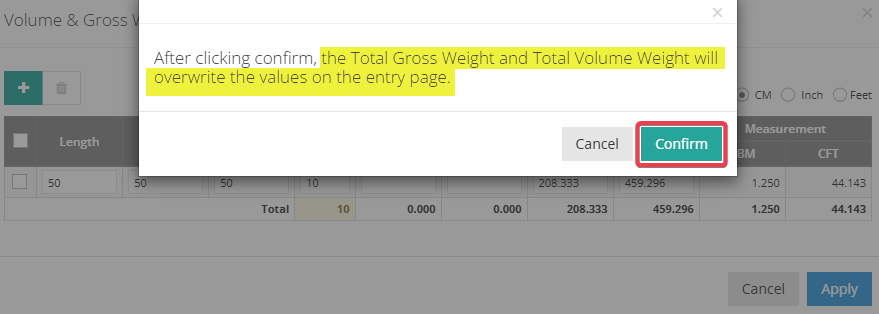
The values entered and confirmed under Set Dimensions will overwrite the Gross Weight field in the HAWB Basic information.
A pop-up notification will appear to remind you of this overwrite action when you click Confirm.
Package Piece Consistency
We recommend filling in the package pieces first in the HAWB (House) Basic information, as there may be multiple dimensions across a large number of pieces.
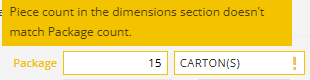
If, during the Set Dimensions entry, the piece count does not match the value on the HAWB Shipment Basic page, the system will display a notification to remind users to recheck and confirm the correct package pieces, as the screenshot below shows.