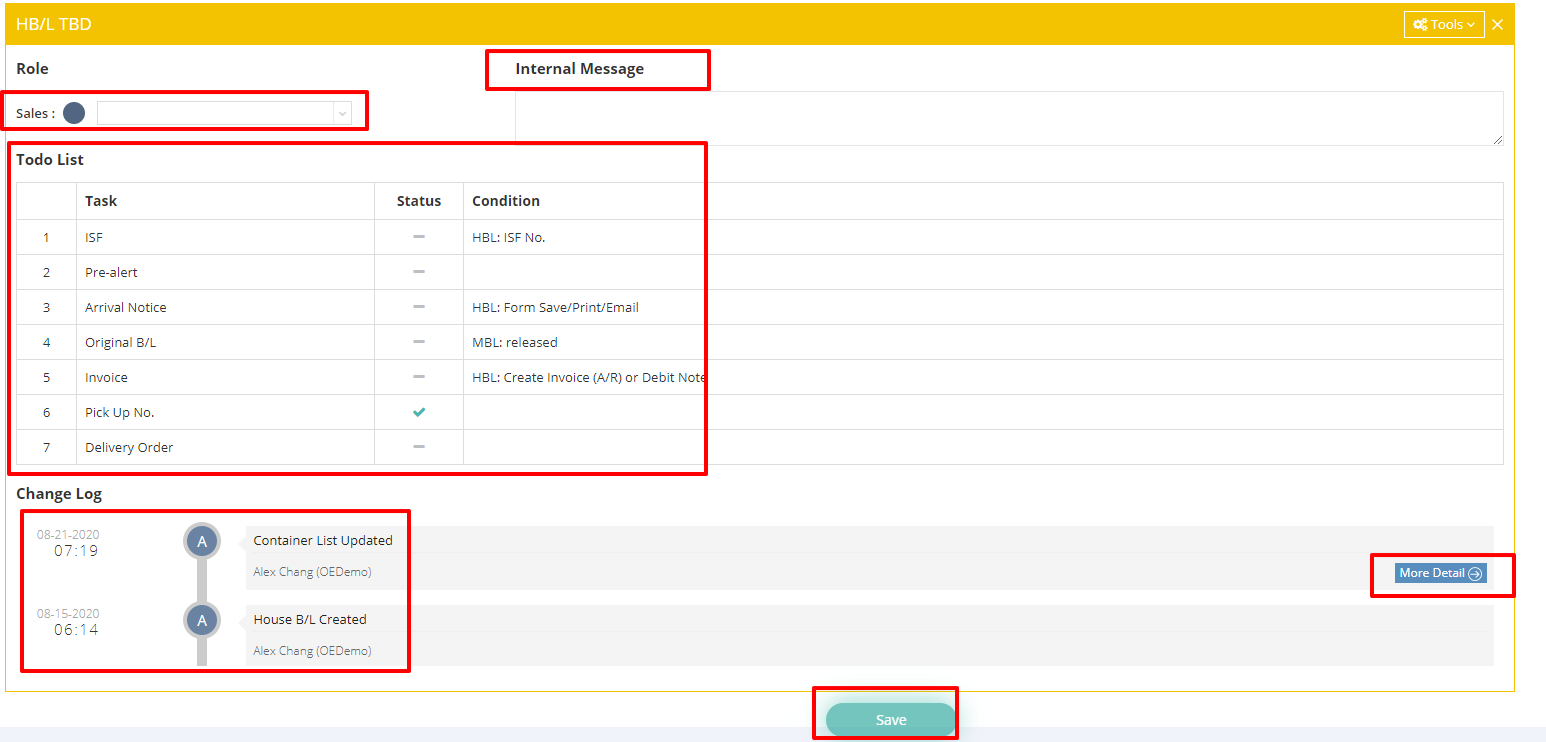
This article introduces the Status Tab in the Ocean Import module.
I. Change Log
All updates and modifications related to shipments can be found in the "Change Log" under the Status tab.
You can click the blue "More Details" button in each Change Log to view the specific changes made to the shipment.
II. Role and Internal Message
- OP in Charge (Operation in Charge)
Each shipment is assigned to a designated Operation team member. If needed, you have the option to reassign your shipment to a different Operation user. Additionally, you can use the "Internal Message" box associated with the shipment to leave notes or communicate with your Operation colleagues internally.
Note: If you are in an Operation role, you may reassign your shipment files to another Operation user. However, you are not permitted to reassign shipment files belonging to other Operation users to yourself. By default, only users with the General Manager or Operations Manager role have the authority to perform this action.
Users in other roles can request this functionality with approval from an Admin or General Manager, after which a GoFreight support agent can grant access.

- Salesperson in Charge
You can designate the Sales in charge by using the Sales field in the House Bill of Lading (HB/L) section.
III. Todo List
The Todo List will display the status of your tasks, reminding you of any outstanding items and the current conditions of each task. If you want to learn more about the Todo List, please refer to the following video: